Documentation
Trip Statistics & Efficiency Telematics
Drive Assist provides comprehensive trip analysis, energy accounting, and altimetry metrics for the Geely EX2 / Geometry E (IHU629G).
🗺️ Architectural Roadmap
flowchart TD
    subgraph P1["Phase 1 (Active)"]
        CHART["Daily Bar Chart\n(Interactive distance by day)"]
        NAV["Day Navigator (◀ / ▶)\n(Switch between calendar days)"]
        ALTIMETRY["Altimetry Dashboard\n(D+ Ganho, D- Perda, Saldo)"]
        LOG["ABRP-Style Daily Log\n(Chronological trips & charges)"]
        HOME["Home Screen Toggle\n(Left status rail switcher)"]
    end

    subgraph P2["Phase 2 (Planned)"]
        CONT["Continuous Trip Stream\n(Multi-day chronological list)"]
        MULTI["Segment Multi-Selector\n(Select consecutive trip legs)"]
        SECT["Saved Named Sections\n('Subida da Serra', 'Viagem Litoral')"]
        AGG["Section True Efficiency\n(Aggregated distance, D+, kWh/100km)"]
    end

    subgraph P3["Phase 3 (Planned)"]
        PRE["Trip Pre-Naming\n(Name a planned journey before start)"]
        POPUP["Post-Drive Card Popup\n(Summary card upon shifting to Park)"]
        PROMPT["Smart Continuity Prompt\n('Continua após a parada / recarga?')"]
        AUTO_JOIN["Automatic Segment Stitching\n(Join legs separated only by charging)"]
    end

    P1 --> P2 --> P3
⚡ Phase 1: Daily Statistics & ABRP Session Log (Current)
Phase 1 provides an interactive daily overview directly on the IHU display:
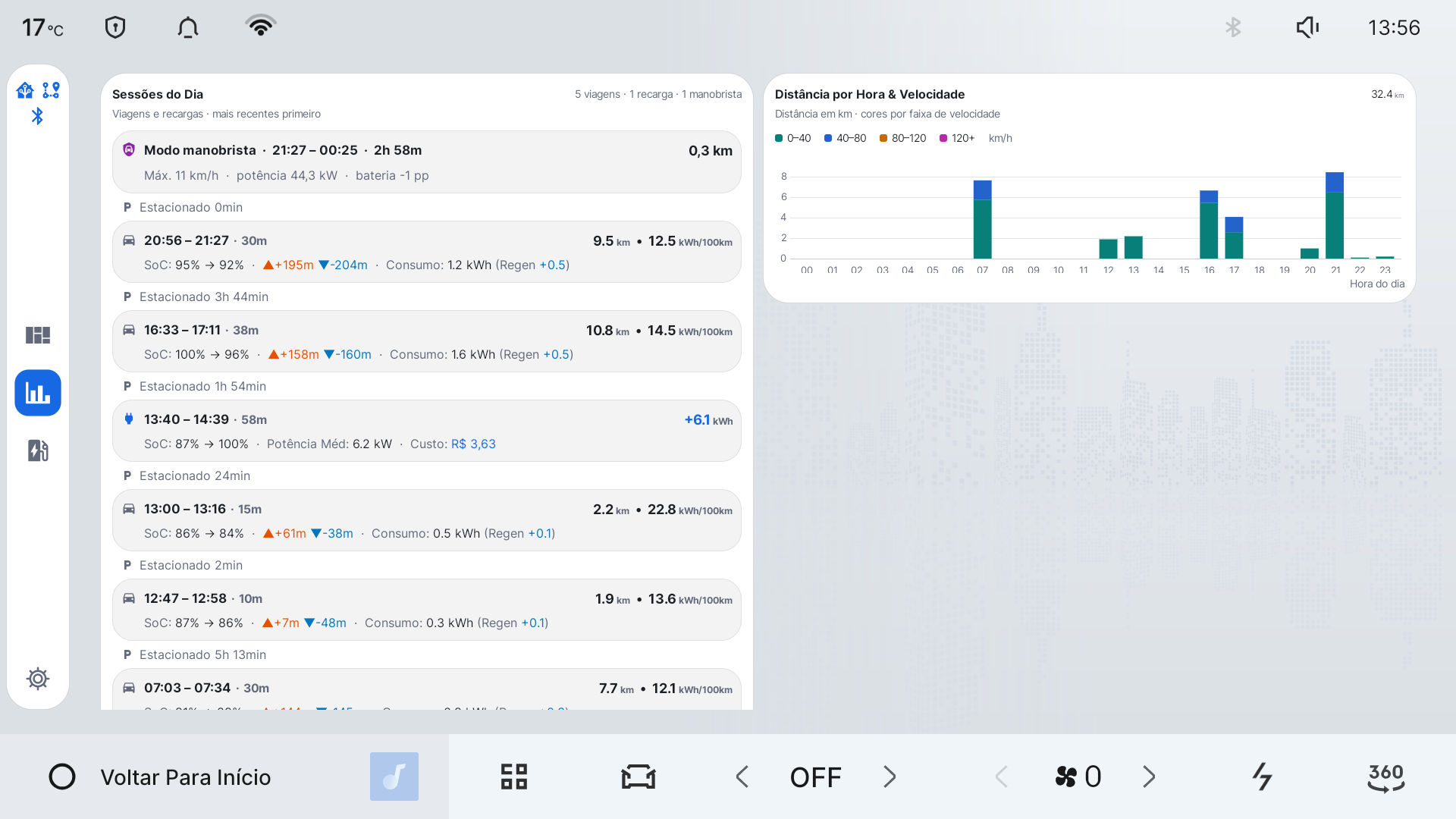 Figure 1: Drive Assist’s chronological session log and hourly distance chart, running live on the Geely EX2 IHU629G head unit (1920x1080 display). Sessões do Dia lists the day’s drives, charging sessions, and Valet-mode intervals in reverse-chronological order — each row showing time range, duration, distance, efficiency (kWh/100km), SoC change, ascent/descent, and energy consumed/regenerated, with parked gaps interleaved between them. Distância por Hora & Velocidade breaks the day’s total distance down by hour, colored by speed bucket (0–40, 40–80, 80–120, 120+ km/h).
1. Interactive Daily Bar Chart & Navigation
- Bar Chart (MPAndroidChart): Displays daily distance (
last_odo_km - first_odo_km) over the past 14 days. - Interactive Day Selection: Tap any column on the bar chart, or tap the
[ ◀ Ontem ]and[ Amanhã ▶ ]navigation buttons to inspect that day’s statistics. - Visual Highlighting: The currently selected day is prominently accented while other bars remain subtle.
2. Cumulative Altimetry (D+ & D-)
Elevation changes heavily influence EV range. Rather than simple point-to-point elevation difference, Drive Assist tracks cumulative vertical work:
- D+ (Ganho Positivo Acumulado): Sum of all climbing elevation gains throughout the day ($\sum \Delta h > 0$, noise-filtered $> 3\text{m}$).
-
D- (Perda Negativa Acumulada): Sum of all descending elevation losses ($\sum \Delta h < 0$). - Saldo Líquido: $\text{D+} - \text{D-}$ (net elevation gain/loss).
- Correlating D+ with Regeneração (kWh) and Eficiência (kWh/100km) shows exactly how terrain shaped battery consumption.
3. ABRP-Style Chronological Session Log
Inspired by A Better Routeplanner’s daily diary, the selected day’s activities are displayed in an interleaved, chronological feed:
- 🚗 Viagens (Drives):
- Departure & Arrival time, duration (e.g.
08:15 – 09:30 • 1h 15m). - Distance (km) and SoC change (
100% ➔ 64%). - Altimetry breakdown (
▲ +680 m ▼ -210 m). - True Efficiency (
kWh/100km) and energy regenerated (kWh).
- Departure & Arrival time, duration (e.g.
- 🔌 Recargas (Charges):
- Start & completion time, duration.
- Energy added in
+kWh. - SoC change (
28% ➔ 80%). - Charging speed (
kW avg) with AC mains vs DC Fast Charge detection (charge_v >= 250V).
4. Home Screen View Switcher
- A dedicated statistics icon in the left status rail of
ComfortActivityallows swapping the home screen between the standard comfort card grid and the new statistics screen with a single tap.
🛣️ Phase 2: Continuous Trip Segments & Named Sections (Intent)
Phase 2 will move beyond strict 24-hour calendar days to support natural multi-leg journeys:
- Continuous Trip Feed:
- A scrolling timeline of discrete driving trips (
triptable), crossing midnight boundaries seamlessly.
- A scrolling timeline of discrete driving trips (
- Multi-Leg Selection:
- Checkboxes or gesture selection to pick multiple sequential trips (e.g., Trip #42, Trip #43, and Trip #44).
- Saved Named Sections:
- Name and persist custom sections (e.g., “Viagem a Curitiba”, “Subida da Serra”, or “Corrida de Aplicativo - Sexta”).
- The True Trip Efficiency Aggregate:
- Calculates combined metrics across all selected legs:
- Distance $= \text{Odo}{\text{end}} - \text{Odo}{\text{start}}$.
- Cumulative D+ and D-.
- Total Regen captured (kWh).
- Time-weighted HVAC active percentage.
- True integrated efficiency (kWh/100km).
- Calculates combined metrics across all selected legs:
🤖 Phase 3: Interactive Trip Assistant (Intent)
Phase 3 will introduce smart trip lifecycle management:
- Trip Pre-Naming & Departure Intent:
- Driver can name an upcoming trip before departure (or via Home Assistant MQTT command).
- Post-Drive Arrival Card:
- When shifting to Park (
gear = 4), a summary card automatically displays key stats for that specific leg.
- When shifting to Park (
- Smart Continuity Prompt:
- The card will prompt: “Deseja continuar esta viagem após a parada ou recarga?”
- If confirmed, subsequent driving legs and charging stops remain stitched into the same active session until the driver marks it finished.