Documentation
Connect Drive Assist to Home Assistant
English · Português (Brasil)
This connection places the car’s battery, range, location, charging state, climate state, and other available readings in your Home Assistant. It can also send selected commands and information between Home Assistant and the car.
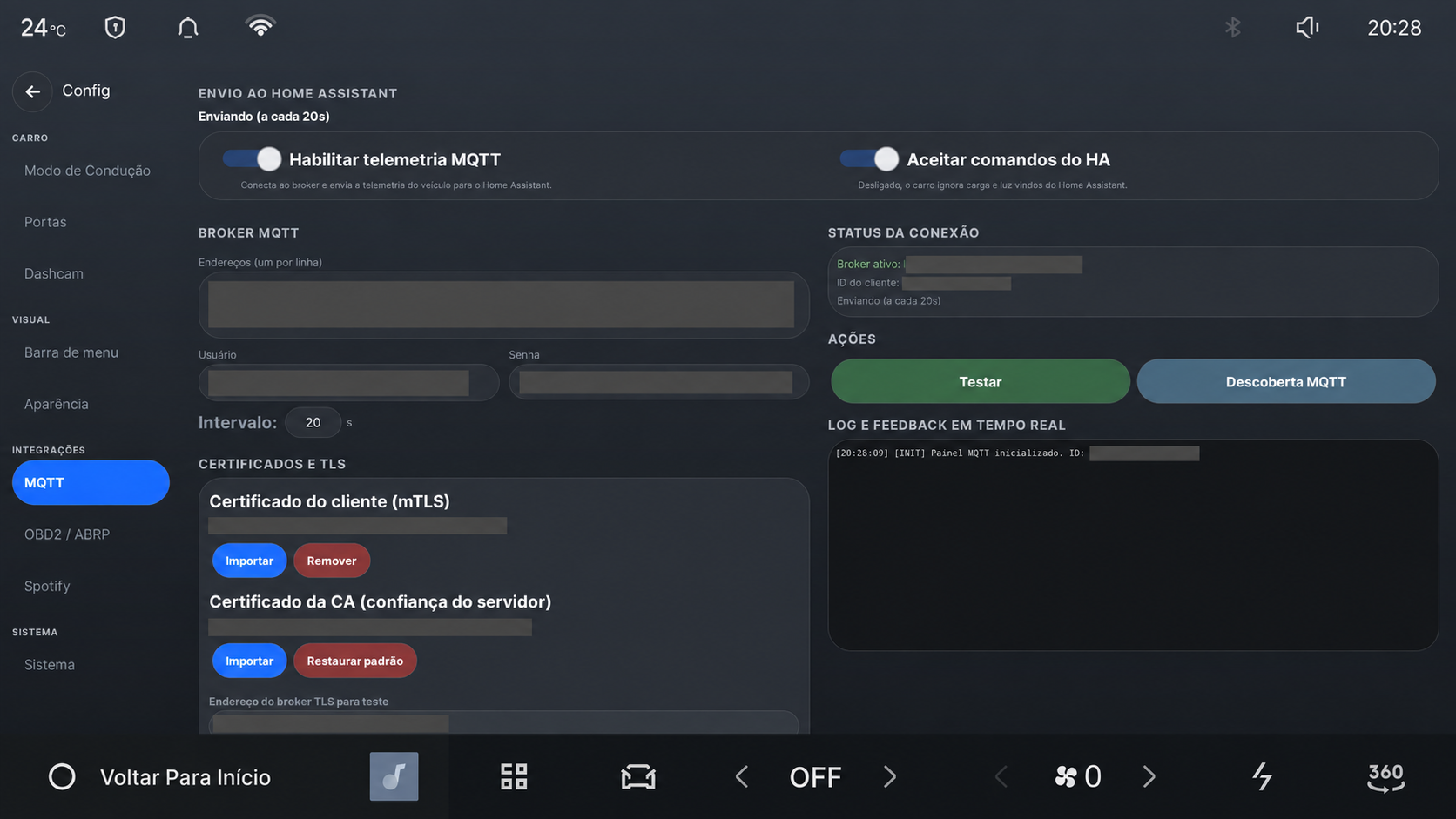
The gray areas conceal the owner’s broker addresses, account name, certificate identifiers, and device identifiers. These values must never appear in published screenshots.
Before you start
You need:
- a working Home Assistant installation;
- an MQTT broker that Home Assistant can use;
- the broker address, port, username, and password;
- a network path from the car to that broker.
The car publishes detailed location and usage data. Use an encrypted connection when traffic leaves your home network. Create a separate MQTT account for the car and give it access only to the required Drive Assist topics.
Connect the car
- On the car, open Settings → MQTT.
- Enable MQTT telemetry.
- Enter the broker address. Use
ssl://ortls://with port8883for an encrypted connection. Usetcp://with port1883only on a network you trust. - Enter the MQTT username and password.
- Save the settings, then select Test connection.
- Select MQTT discovery. Home Assistant should create a device for the car and add its available entities.
The status area on the same screen shows the active broker and the most recent successful transmission. A successful connection test proves that the broker is reachable and accepted the credentials; Home Assistant discovery confirms that the entities were published.
Choose what Home Assistant may do
Telemetry and remote commands are separate settings. Leave Accept commands from Home Assistant disabled if you only want to read vehicle data. When it is enabled, Home Assistant can send supported commands such as climate adjustments, charging settings, and parking mode actions.
The garage button and context panel also use MQTT. Home Assistant decides when the button is available, receives the button press, performs the garage action, and returns the current state. Drive Assist does not discover or operate a gate directly.
Privacy and security
The configured broker receives the telemetry you enable. That may reveal the car’s position, routes, charging routine, and times when it is away from home. Protect the broker account, certificate files, and any screenshots of this page. Do not publish broker addresses, usernames, passwords, tokens, VIN fragments, or precise coordinates.
For certificates, topic names, entity lists, example automations, and diagnostic messages, use the MQTT and Home Assistant technical reference.