Documentation
HVAC Effort Table Architecture
The Effort Table (EffortTable.java) defines a fixed, 11-column grid representing vehicle HVAC effort from maximum cooling through off to maximum heating:
C5 C4 C3 C2 C1 0 W1 W2 W3 W4 W5
The scale is absolute — it measures the physical effort the vehicle is expending, rather than a relative delta from initial vehicle startup.
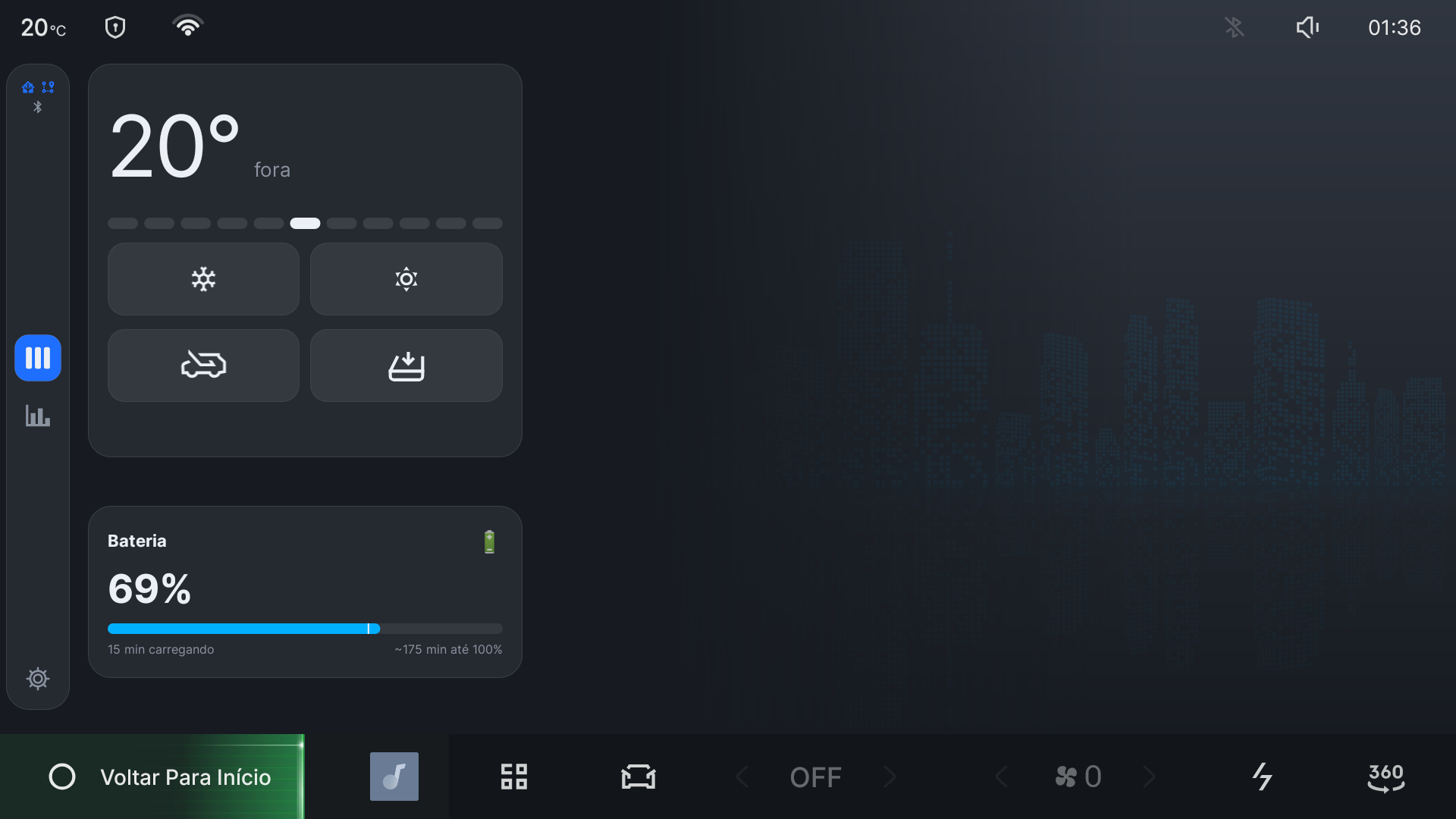 Figure 1: Live Comfort Ruler on the Geely EX2 IHU629G touchscreen. The driver interacts with the absolute effort scale (Warmer / Cooler buttons and center ruler), translating thermal comfort into fan, temperature setpoint, and AC compressor commands with dynamic ambient weather sliding.
1. Column Model & Levers
Each column in the table configures five distinct HVAC control levers:
| Lever | Field / Property | Description |
|---|---|---|
| Power | HVAC_POWER_ON |
Binary master power. Level 0 is strictly OFF. Levels C1..C5 and W1..W5 are ON. |
| Machine (AC) | HVAC_AC_ON |
Engages compressor for cooling or heat pump for heating. False in free ambient columns. |
| Setpoint | HVAC_TEMPERATURE_SET |
Target cabin temperature (°C). Active when machine = true, NaN when off. |
| Fan Speed | HVAC_FAN_SPEED |
Blower intensity: [1, 2, 4, 6, 8] across levels 1 to 5. |
| Airflow Direction | HVAC_FAN_DIRECTION |
Distribution mask: DIR_FACE (1), DIR_FEET (2), DIR_FACE_FEET (3), DIR_GLASS (4), or DIR_GLASS_FEET (6). |
| Recirculation | HVAC_RECIRC_ON |
Cabin air recirculation. Used as an intensity lever on cooling; restricted on heating. |
Pinned Extremes vs. Sliding Middle
- Pinned Extremes (
C5,W5,0):0: HVAC powered completely off.C5: All-out cooling — maximum fan (8), lowest setpoint (17 °C), recirculation active, air to face.W5: All-out heating — maximum fan (8), highest setpoint (32 °C), fresh air, air to face + feet.
- Sliding Middle (
C1..C4,W1..W4): The boundary between free outside air and compressor/heater engagement shifts dynamically with ambient outside temperature (outC).
2. Weather Sliding & Free Columns
When outside air can comfortably assist, lower effort columns use fresh air without running the compressor (machine = false):
freeColumns(outC, coldSide)
Cold Side (C1..C5)
- Reference:
FRESH_LIMIT_C = 28.0 °C. Moving outside air is comfortable on skin up to 28 °C. - Expansion: Below 28 °C, free ambient columns expand at 1 column per 4 °C drop:
\(\text{Free Columns} = \min\left(3, \left\lfloor\frac{28.0 - \text{outC}}{4.0}\right\rfloor + 1\right)\)
- Above 28 °C: 0 free columns (all levels
C1..C5use the compressor). - 25 °C – 28 °C: 1 free column (
C1ambient,C2..C5compressor). - 21 °C – 24 °C: 2 free columns (
C1..C2ambient,C3..C5compressor). - Below 21 °C: 3 free columns (
C1..C3ambient,C4..C5compressor).
- Above 28 °C: 0 free columns (all levels
Warm Side (W1..W5)
- Reference:
CABIN_TARGET_C = 23.0 °C. Outside air can only heat if ambient temperature exceeds cabin target. - Expansion: Above 23 °C, free ambient columns expand at 1 column per 2 °C rise: \(\text{Free Columns} = \min\left(3, \left\lfloor\frac{\text{outC} - 23.0}{2.0}\right\rfloor + 1\right)\)
3. Airflow Direction & Recirculation Strategy
The airflow path and recirculation state are engineered to maximize passenger comfort and prevent glass fogging:
Airflow Direction
- Cold Side:
- Free Ambient (
machine = false): Directed to Face (DIR_FACE). Moving fresh air across skin provides direct cooling sensation. - First Compressor Step (
level == free + 1): Directed to Glass / Defrost (DIR_GLASS). The compressor’s initial cold output is deflected away from passenger faces while gently chilling cabin air. - Higher Compressor Steps (
level > free + 1): Directed to Face (DIR_FACE) for direct cooling.
- Free Ambient (
- Warm Side:
- Thermal Comfort & Defogging Physics (
W2..W4when $\text{outC} < 23^\circ\text{C}$): Directed to Glass + Feet (DIR_GLASS_FEET,6). Warm air flows to footwell vents for lower-body comfort while washing the windshield with a warm air boundary layer to prevent glass fogging from occupant respiration. - Mild Windshield Warming (
W1when $\text{outC} < 23^\circ\text{C}$): Directed to Glass (DIR_GLASS), using outside air — see Recirculation Logic below. - Warm Days ($\text{outC} \ge 23^\circ\text{C}$): Directed to Feet (
DIR_FEET) since ambient air is warm and glass fogging does not occur. - All-Out Heating (
W5): Directed to Face + Feet (DIR_FACE_FEET) for immediate full-body warmth.
- Thermal Comfort & Defogging Physics (
Recirculation Logic
- Cooling: Recirculation is an intensity lever. When ambient outside air is hot ($\text{outC} > 23^\circ\text{C}$) and the compressor is operating past the first step (
level > free + 1), recirculation engages because cooling already-conditioned cabin air is substantially more effective than cooling hot outside air. - Heating: Recirculation is disabled across every heating level, with no exception.
W1used to be an exception, on the reasoning that its gentle output made recirculated air “safe” — backwards in practice:W1is the column aimed directly at the windshield (DIR_GLASS), which is exactly where recirculated cabin air’s occupant-respiration humidity is most likely to condense into fog on contact with cold glass. Outside air, even cold, is what actually clears a windshield — the same reason every real car’s defrost mode forces outside air.
4. State Fitting Algorithm (fit)
When physical OEM controls or third-party apps alter HVAC settings, EffortTable.fit() maps the vehicle state back to the nearest column:
- Worst-Case Distance: Distance is measured as the maximum number of discrete button presses a lever must advance to reach all-out, not the sum across levers.
- Fan: Measured by magnitude — the highest column whose flow requirement is met or exceeded.
- Compressor Gating: Machine state strictly gates valid columns: a compressor-off vehicle cannot map to a compressor-on column, and vice versa.
- Approximate State (“C4ish”): If physical levers are split across recipes (e.g., fan at
C5, but direction atC3), the ruler marks the state asapprox = true.- The current effort number remains displayed.
- The first user tap on Cool or Warm instantly snaps all physical levers to an exact column recipe.
5. Automatic Re-sliding Guards
As ambient outside temperature changes, ComfortRuler re-slides the table to update recipes while keeping the driver’s selected effort level (level) steady.
To avoid erratic changes, an automatic re-slide only occurs when all of the following conditions are met:
- Drift Magnitude: Outside temperature drifts by $\ge 2.0^\circ\text{C}$ (
DRIFT_C) from the table’s build temperature. - Sustained Duration: The temperature shift persists continuously for $\ge 10\text{ minutes}$ (
DRIFT_MS) to ignore tunnels, stoplights, or brief thermal pockets. - Quiet Period: No UI taps have occurred within the last 60 seconds (
QUIET_AFTER_TAP_MS). - Exact Column Match: The vehicle must not be in an approximate state (
approx == false). If a driver adjusted a lever manually, automatic re-sliding is suspended so it never overrides manual intent.
[!NOTE] User Taps Bypass Timers: When the driver taps Cool or Warm, the ruler immediately checks if ambient temperature has drifted by $\ge 2.0^\circ\text{C}$ and rebuilds the table instantly, ensuring immediate user actions always reflect current weather.